GavickPro News

-
Introducing Joomla MCP: A Simpler Way to Manage Your Website with AI
 #ja-blog-joomla-mcp { color:#33414e; font-size:16px; line-height:1.8; font-family: Inter, -apple-system, BlinkMacSystemFont, "Segoe UI", Roboto, Arial, sans-serif; } #ja-blog-joomla-mcp * { font-family: inherit; } #ja-blog-joomla-mcp .post-lead { font-size:19px; line-height:1.75; color:#33414e; } #ja-blog-joomla-mcp .post-lead strong { color:#007AFF; } #ja-blog-joomla-mcp h2 { font-weight:700; margin:40px 0 14px; font-size:27px; line-height:1.3; } #ja-blog-joomla-mcp p { margin:0 0 16px; } #ja-blog-joomla-mcp ul { margin:0 0 18px; padding-left:0; list-style:none; } #ja-blog-joomla-mcp ul li { position:relative; padding:9px 0 9px 30px; border-bottom:1px solid #eef2f6; } #ja-blog-joomla-mcp ul li:last-child { border-bottom:none; } #ja-blog-joomla-mcp ul li:before { content:"\1F511"; position:absolute; left:0; top:9px; } #ja-blog-joomla-mcp ol { counter-reset:step; margin:0 0 18px; padding-left:0; list-style:none; } #ja-blog-joomla-mcp ol li { position:relative; padding:8px 0 8px 42px; } #ja-blog-joomla-mcp ol li:before { counter-increment:step; content:counter(step); position:absolute; left:0; top:8px; width:26px; height:26px; line-height:26px; text-align:center; background:#007AFF; color:#fff; border-radius:50%; font-size:13px; font-weight:700; } #ja-blog-joomla-mcp .ja-callout { background:#f4f8ff; border-left:4px solid #007AFF; border-radius:8px; padding:18px 22px; margin:24px 0; } #ja-blog-joomla-mcp .ja-callout p:last-child { margin-bottom:0; } #ja-blog-joomla-mcp .ja-cta { text-align:center; margin:34px 0 10px; } #ja-blog-joomla-mcp .ja-cta a.btn { display:inline-block; background:#007AFF; color:#fff; text-decoration:none; padding:14px 32px; border-radius:8px; font-weight:600; font-size:16px; margin:6px; } #ja-blog-joomla-mcp .post-signoff { font-style:italic; color:#8a97a6; margin-top:30px; }
Managing a Joomla website can now be much simpler. With Joomla MCP, you can ask an AI assistant to help with everyday website tasks using normal, everyday language.
Website management should be easier
Perhaps you only want to publish an article, check recent posts or organize content. But even a small task can mean opening several screens, finding the right settings, or waiting for someone technical to help.
Joomla MCP gives you another option: simply describe what you need, and let an AI assistant help carry out the task on your Joomla website.
What is Joomla MCP?
Joomla MCP connects your Joomla website to a supported AI assistant, such as Claude, ChatGPT or Gemini. After a short setup, you can type a request in plain language. The assistant can then work with your website, but only within the permissions of the Joomla account you connect.
Nothing is installed on your website. You control what the connected account is allowed to do, and you can remove access at any time, just as you would change a password.
How Joomla MCP can help you
- Publish and organize content — ask the assistant to create a post, place it in the correct category or show your most recent articles.
- Save time on routine work — complete common Joomla tasks without searching through several administrator screens.
- Keep control of access — the assistant can only use the permissions of the Joomla account you provide, so you decide what it can and cannot do.
Getting started takes about five minutes
- Open your Joomla administrator and enable three built-in features. They are already included with Joomla, so there is nothing new to install.
- Create a personal access key from your Joomla user profile.
- Copy the setup details prepared for you and paste them into your AI assistant.
Once connected, you can manage supported tasks by writing simple requests. You do not need to learn code or remember complicated technical commands.
Joomla MCP works with Joomla 4, 5 and 6, and with AI assistants that support MCP connections, including Claude, ChatGPT and Gemini.
— The JoomlArt Team -
Introducing JA Voyara: An Elegant Travel Agency Joomla Template
 #ja-blog-voyara { color:#33414e; font-size:16px; line-height:1.8; font-family: Inter, -apple-system, BlinkMacSystemFont, "Segoe UI", Roboto, Arial, sans-serif; } #ja-blog-voyara * { font-family: inherit; } #ja-blog-voyara .post-lead { font-size:19px; line-height:1.75; color:#33414e; } #ja-blog-voyara .post-lead strong { color:#007AFF; } #ja-blog-voyara h2 { font-weight:700; margin:42px 0 14px; font-size:27px; line-height:1.3; } #ja-blog-voyara h3 { font-weight:700; margin:26px 0 8px; font-size:20px; color:#1c2733; } #ja-blog-voyara p { margin:0 0 16px; } #ja-blog-voyara ul { margin:0 0 18px; padding-left:0; list-style:none; } #ja-blog-voyara ul li { position:relative; padding:7px 0 7px 30px; } #ja-blog-voyara ul li:before { content:"\2713"; position:absolute; left:0; top:7px; color:#007AFF; font-weight:700; } #ja-blog-voyara .ja-spec { margin:24px 0; padding:0; list-style:none; display:flex; flex-wrap:wrap; gap:10px; } #ja-blog-voyara .ja-spec li { padding:8px 16px; background:#f1f6ff; border:1px solid #dbe7fb; border-radius:999px; font-size:14px; color:#1c2733; } #ja-blog-voyara .ja-spec li:before { content:none; } #ja-blog-voyara .ja-spec li strong { color:#007AFF; } #ja-blog-voyara .ja-callout { background:#f4f8ff; border-left:4px solid #007AFF; border-radius:8px; padding:18px 22px; margin:24px 0; } #ja-blog-voyara .ja-callout p:last-child { margin-bottom:0; } #ja-blog-voyara .ja-cta { text-align:center; margin:34px 0 10px; } #ja-blog-voyara .ja-cta a.btn { display:inline-block; background:#007AFF; color:#fff; text-decoration:none; padding:14px 32px; border-radius:8px; font-weight:600; font-size:16px; margin:6px; } #ja-blog-voyara .ja-cta a.ghost { background:#fff; color:#007AFF; border:1px solid #007AFF; } #ja-blog-voyara .promo { background:#0a1f44; color:#fff; border-radius:12px; padding:30px 26px; margin:34px 0; text-align:center; } #ja-blog-voyara .promo a.btn { display:inline-block; background:#007AFF; color:#fff; text-decoration:none; padding:13px 32px; border-radius:8px; font-weight:600; font-size:16px; margin-top:14px; } #ja-blog-voyara .post-signoff { font-style:italic; color:#8a97a6; margin-top:30px; }
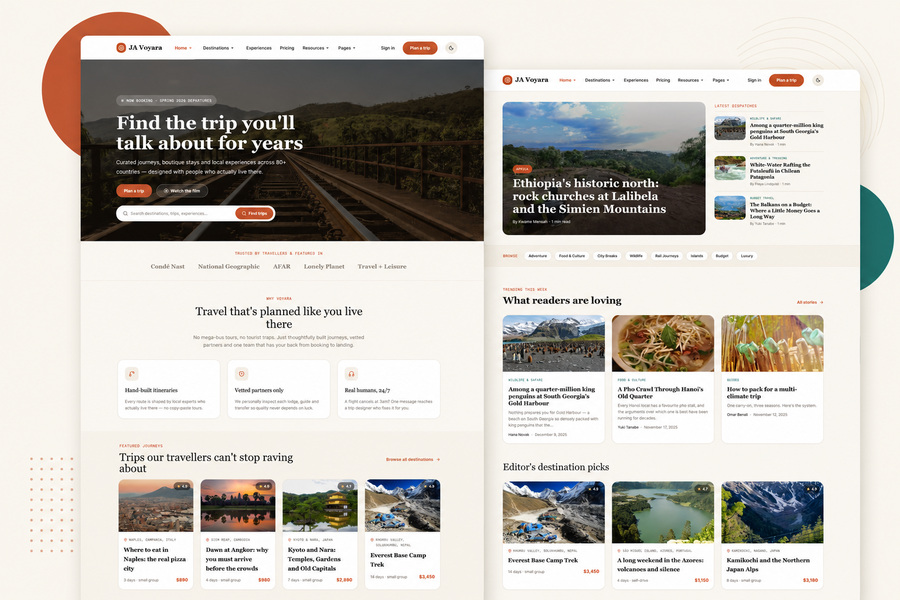
The journeys you plan are unforgettable - your website should be too. Meet JA Voyara, our elegant new Joomla template made for travel agencies, tour operators and travel planners.
JA Voyara brings your destinations, curated journeys and travel stories together in a warm, magazine-style design that feels premium the moment a visitor arrives. Immersive homepage layouts put your featured trips, destination highlights and traveller reviews front and center. Card-based destination listings surface location, duration, travel style, ratings and pricing at a glance, while spacious editorial travel stories - complete with full-width photography and author details - turn inspiration into bookings. A clear, flexible pricing page presents your tour packages, planning services or memberships with feature comparisons, FAQs and testimonials, and beautifully designed light and dark modes keep it all looking refined, day or night. Built on the T4 Framework and running on Joomla 6, it's responsive, fast, and ready to customize - no coding required.
- Best for Travel & Tourism
- T4 Framework
- Joomla 6
- Light & Dark modes
A warm, editorial style that sells the journey
JA Voyara brings destinations, curated journeys and authentic travel stories together in a refined, magazine-style design. It's built to make a memorable first impression - and to turn browsers into bookings - without you needing to write a single line of code.
Everything a travel website needs
Beautiful destination & journey listings
Present your tours through elegant card layouts that highlight location, duration, travel style, ratings, pricing and featured trips - so visitors find the right experience at a glance.
Travel stories & editorial content
Turn inspiration into bookings with a dedicated experiences section and spacious travel-story layouts - full-width photography, author info, topic tags and related articles that keep readers engaged.
A clear, flexible pricing page
Show your packages, planning services or memberships with attractive pricing cards, feature comparisons, FAQs and testimonials - making it easy for travellers to choose and book.
Beautiful light & dark modes
A warm palette, refined typography and balanced contrast keep your premium travel look consistent in both light and dark styles - comfortable to browse in any environment.
JA Voyara is built on the T4 Framework and runs on Joomla 6 - responsive, fast, and simple to customize with a visual layout builder. All standard Joomla pages come fully styled, too.
Who it's for
- Travel agencies & tour operators that want a website as polished as their trips
- Independent travel planners building trust with a professional online presence
- Experience-led tourism brands that tell stories and sell curated journeys
Get JA Voyara
JA Voyara is available now and included with any JoomlArt membership - one plan unlocks Voyara, all 200+ templates, and everything we release next. Plans start from just $89, with a 100% money-back guarantee.
Give your travel brand a stunning new website
JA Voyara + 200+ templates, one simple membership.
Explore membership plans →Ready to inspire your next traveller? Start with JA Voyara.
— The JoomlArt Team -
Dark Mode Roll-out Continues: 4 More Templates Updated
 #ja-blog-dm-wave3 { color:#33414e; font-size:16px; line-height:1.75; } #ja-blog-dm-wave3 .post-lead { font-size:19px; line-height:1.7; color:#33414e; } #ja-blog-dm-wave3 .post-lead strong { color:#007AFF; } #ja-blog-dm-wave3 h2 { font-weight:700; margin:40px 0 14px; font-size:27px; line-height:1.3; } #ja-blog-dm-wave3 p { margin:0 0 16px; } #ja-blog-dm-wave3 ul { margin:0 0 18px; padding-left:0; list-style:none; } #ja-blog-dm-wave3 ul li { position:relative; padding:8px 0 8px 30px; border-bottom:1px solid #eef2f6; } #ja-blog-dm-wave3 ul li:last-child { border-bottom:none; } #ja-blog-dm-wave3 ul li:before { content:"\1F319"; position:absolute; left:0; top:8px; } #ja-blog-dm-wave3 ol { counter-reset:step; margin:0 0 18px; padding-left:0; list-style:none; } #ja-blog-dm-wave3 ol li { position:relative; padding:8px 0 8px 42px; } #ja-blog-dm-wave3 ol li:before { counter-increment:step; content:counter(step); position:absolute; left:0; top:6px; width:26px; height:26px; line-height:26px; text-align:center; background:#007AFF; color:#fff; border-radius:50%; font-size:13px; font-weight:700; } #ja-blog-dm-wave3 .ja-callout { background:#f4f8ff; border-left:4px solid #007AFF; border-radius:8px; padding:18px 22px; margin:24px 0; } #ja-blog-dm-wave3 .ja-callout p:last-child { margin-bottom:0; } #ja-blog-dm-wave3 .ja-cta { text-align:center; margin:34px 0 10px; } #ja-blog-dm-wave3 .ja-cta a.btn { display:inline-block; background:#007AFF; color:#fff; text-decoration:none; padding:13px 30px; border-radius:8px; font-weight:600; font-size:16px; margin:6px; } #ja-blog-dm-wave3 .post-signoff { font-style:italic; color:#8a97a6; margin-top:30px; }
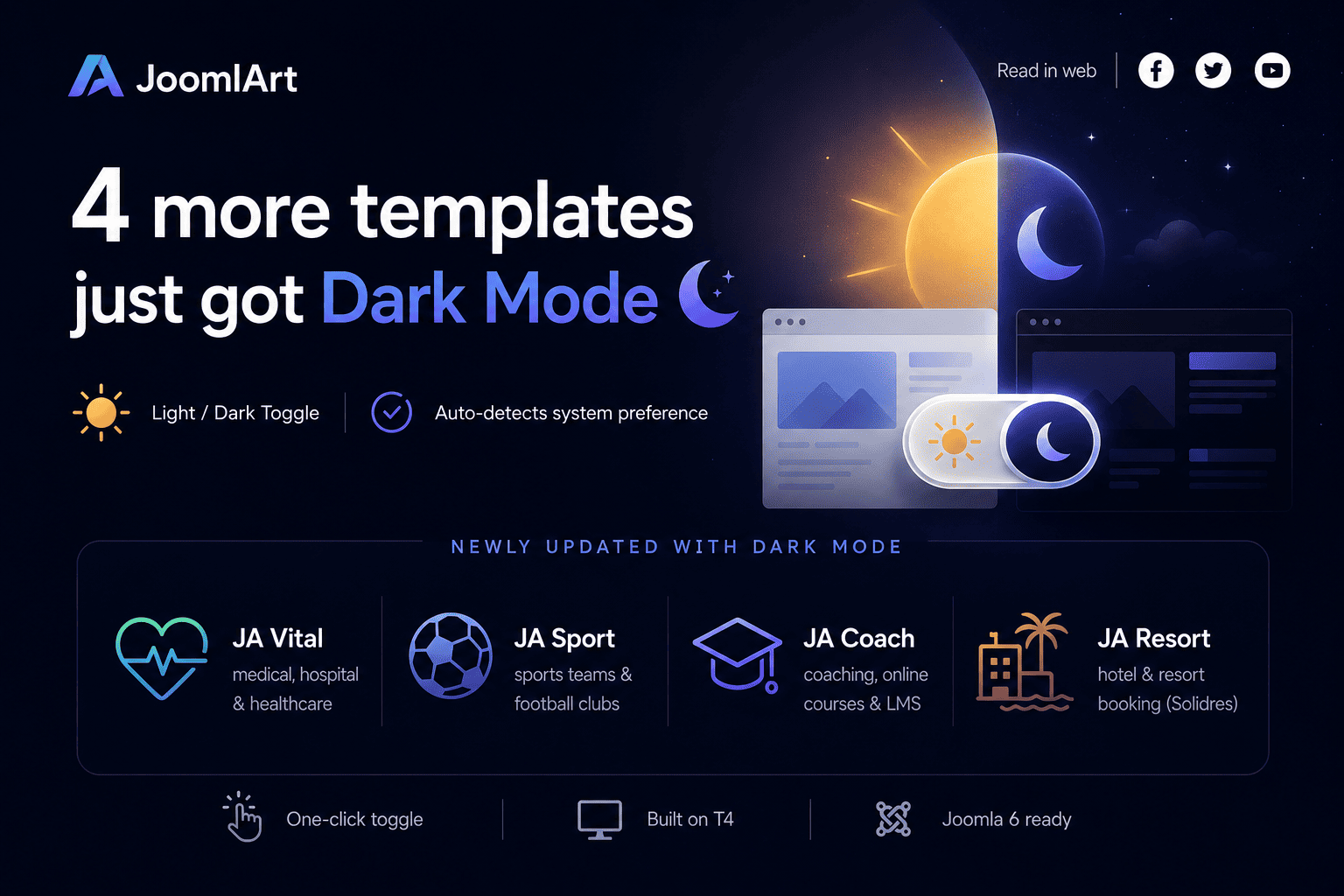
The Dark Mode roll-out isn't slowing down. Four more templates - across four very different industries - now ship with a built-in light / dark toggle.
Newly updated with Dark Mode
Each of these templates now includes a one-click sun / moon toggle, automatic detection of the visitor's system preference, and a remembered choice for returning visitors - while your existing light design stays exactly the same.
- JA Vital - medical, hospital & healthcare
- JA Sport - sports teams & football / soccer clubs
- JA Coach - coaching, online courses & LMS
- JA Resort - hotel & resort booking (Solidres)
All four are built on the T4 Framework and are Joomla 6 ready. Turning on Dark Mode is a simple template update - your content and settings stay in place.
Why Dark Mode?
A dark option is now something visitors expect. It's easier on the eyes in low light, gives your site a more modern, premium feel, and lets each visitor choose the experience they prefer - all without changing your site's structure.
How to update
- Download the latest package for your template from your JoomlArt account.
- Install the update over your current template.
- Open your site and click the sun / moon toggle in the header to preview Dark Mode.
Prefer light only? Leave it - light mode remains the default and untouched. Every one of these updates is included with a JoomlArt membership, along with all 200+ templates and everything we ship next.
More Dark Mode templates are on the way - stay tuned.
— The JoomlArt Team -
Introducing JA Nexora: A Modern AI & SaaS Joomla Template
 #ja-blog-nexora { color:#33414e; font-size:16px; line-height:1.75; } #ja-blog-nexora .post-lead { font-size:19px; line-height:1.7; color:#33414e; } #ja-blog-nexora .post-lead strong { color:#007AFF; } #ja-blog-nexora h2 { font-weight:700; margin:42px 0 14px; font-size:27px; line-height:1.3; } #ja-blog-nexora h3 { font-weight:700; margin:26px 0 8px; font-size:20px; color:#1c2733; } #ja-blog-nexora p { margin:0 0 16px; } #ja-blog-nexora ul { margin:0 0 18px; padding-left:0; list-style:none; } #ja-blog-nexora ul li { position:relative; padding:6px 0 6px 30px; } #ja-blog-nexora ul li:before { content:"\2713"; position:absolute; left:0; top:6px; color:#007AFF; font-weight:700; } #ja-blog-nexora .ja-spec { margin:26px 0; padding:0; list-style:none; display:flex; flex-wrap:wrap; gap:10px; } #ja-blog-nexora .ja-spec li { padding:8px 16px; background:#f1f6ff; border:1px solid #dbe7fb; border-radius:999px; font-size:14px; color:#1c2733; } #ja-blog-nexora .ja-spec li:before { content:none; } #ja-blog-nexora .ja-spec li strong { color:#007AFF; } #ja-blog-nexora .ja-callout { background:#f4f8ff; border-left:4px solid #007AFF; border-radius:8px; padding:18px 22px; margin:24px 0; } #ja-blog-nexora .ja-callout p:last-child { margin-bottom:0; } #ja-blog-nexora .ja-cta { text-align:center; margin:34px 0 10px; } #ja-blog-nexora .ja-cta a.btn { display:inline-block; background:#007AFF; color:#fff; text-decoration:none; padding:13px 30px; border-radius:8px; font-weight:600; font-size:16px; margin:6px; } #ja-blog-nexora .ja-cta a.ghost { background:#fff; color:#007AFF; border:1px solid #007AFF; } #ja-blog-nexora .promo { background:#0a1f44; color:#fff; border-radius:12px; padding:30px 26px; margin:34px 0; text-align:center; } #ja-blog-nexora .promo a.btn { display:inline-block; background:#007AFF; color:#fff; text-decoration:none; padding:13px 32px; border-radius:8px; font-weight:600; font-size:16px; margin-top:14px; } #ja-blog-nexora .post-signoff { font-style:italic; color:#8a97a6; margin-top:30px; }
Every company is telling an AI story right now - and every one of them needs a website that looks credible. Meet JA Nexora, our newest Joomla template, built for AI platforms, SaaS products, developer tools, cloud infrastructure and technology startups.
- Best for AI & SaaS
- T4 Framework
- Joomla 6
- Dark & Light styles
Why a dedicated AI & SaaS template?
Technology websites don't behave like brochure sites. Visitors want to understand the product fast, see proof it works, compare plans, and know it plugs into their stack. That means a very specific set of pages - and building them from scratch takes weeks.
JA Nexora ships with those pages already designed, so you can launch a professional technology site in days.
What's inside JA Nexora
A homepage built to convert
A bold hero section, application dashboard preview, platform capabilities, performance metrics, customer testimonials and conversion-focused calls to action - the exact structure modern SaaS landing pages use.
The pages that close deals
- Pricing - present plans and compare features clearly
- Integrations - show the tools you connect to
- Changelog - publish product improvements and build trust
- Solutions - dedicated layouts for developers, engineering teams and platform teams
Dark & Light styles, done properly
JA Nexora keeps consistent typography, cards, dashboards and CTA blocks across both visual modes - the premium look that cloud platforms and developer tools are expected to have.
Technical blog & company pages
Publish engineering articles, AI research, product news and tutorials with modern blog layouts - plus ready-made Company, Team and Contact pages to build trust. Every standard Joomla page is fully styled too.
Built on T4, ready for Joomla 6
Powered by the T4 Framework, JA Nexora gives you flexible layout management, theme customization, reusable blocks and a performance-focused foundation - on Joomla 6, the platform's latest generation.
Not on Joomla 6 yet? Our T4 toolkit - Page Builder, Framework and Blank Template - is now fully Joomla 6 ready, so the upgrade is smoother than you might expect.
Who should use it
- Agencies & freelancers building sites for tech and AI clients - win the pitch with a demo that already looks like their product
- Startups launching a product site without a design team
- Developer tools & cloud platforms that need pricing, integrations and changelog pages out of the box
Get JA Nexora
JA Nexora is available now and included with any JoomlArt membership - one plan unlocks Nexora, all 200+ templates, the full T4 toolkit, and everything we ship next.
One plan. 200+ templates. Including JA Nexora.
Build your next AI or SaaS site on Joomla - starting today.
Explore membership plans →Build the AI website your product deserves.
— The JoomlArt Team -
Dark Mode Roll-out Continues: 7 More Templates Updated
 #ja-blog-dm-wave2 { color:#33414e; font-size:16px; line-height:1.75; } #ja-blog-dm-wave2 .post-lead { font-size:19px; line-height:1.7; color:#33414e; } #ja-blog-dm-wave2 .post-lead strong { color:#007AFF; } #ja-blog-dm-wave2 h2 { font-weight:700; margin:40px 0 14px; font-size:27px; line-height:1.3; } #ja-blog-dm-wave2 h3 { font-weight:700; margin:26px 0 8px; font-size:20px; color:#1c2733; } #ja-blog-dm-wave2 p { margin:0 0 16px; } #ja-blog-dm-wave2 ul { margin:0 0 18px; padding-left:0; list-style:none; } #ja-blog-dm-wave2 ul li { position:relative; padding:8px 0 8px 30px; border-bottom:1px solid #eef2f6; } #ja-blog-dm-wave2 ul li:last-child { border-bottom:none; } #ja-blog-dm-wave2 ul li:before { content:"\1F319"; position:absolute; left:0; top:8px; } #ja-blog-dm-wave2 .ja-callout { background:#f4f8ff; border-left:4px solid #007AFF; border-radius:8px; padding:18px 22px; margin:24px 0; } #ja-blog-dm-wave2 .ja-callout p:last-child { margin-bottom:0; } #ja-blog-dm-wave2 ol { counter-reset:step; margin:0 0 18px; padding-left:0; list-style:none; } #ja-blog-dm-wave2 ol li { position:relative; padding:8px 0 8px 42px; } #ja-blog-dm-wave2 ol li:before { counter-increment:step; content:counter(step); position:absolute; left:0; top:6px; width:26px; height:26px; line-height:26px; text-align:center; background:#007AFF; color:#fff; border-radius:50%; font-size:13px; font-weight:700; } #ja-blog-dm-wave2 .ja-cta { text-align:center; margin:34px 0 10px; } #ja-blog-dm-wave2 .ja-cta a.btn { display:inline-block; background:#007AFF; color:#fff; text-decoration:none; padding:13px 30px; border-radius:8px; font-weight:600; font-size:16px; margin:6px; } #ja-blog-dm-wave2 .post-signoff { font-style:italic; color:#8a97a6; margin-top:30px; }
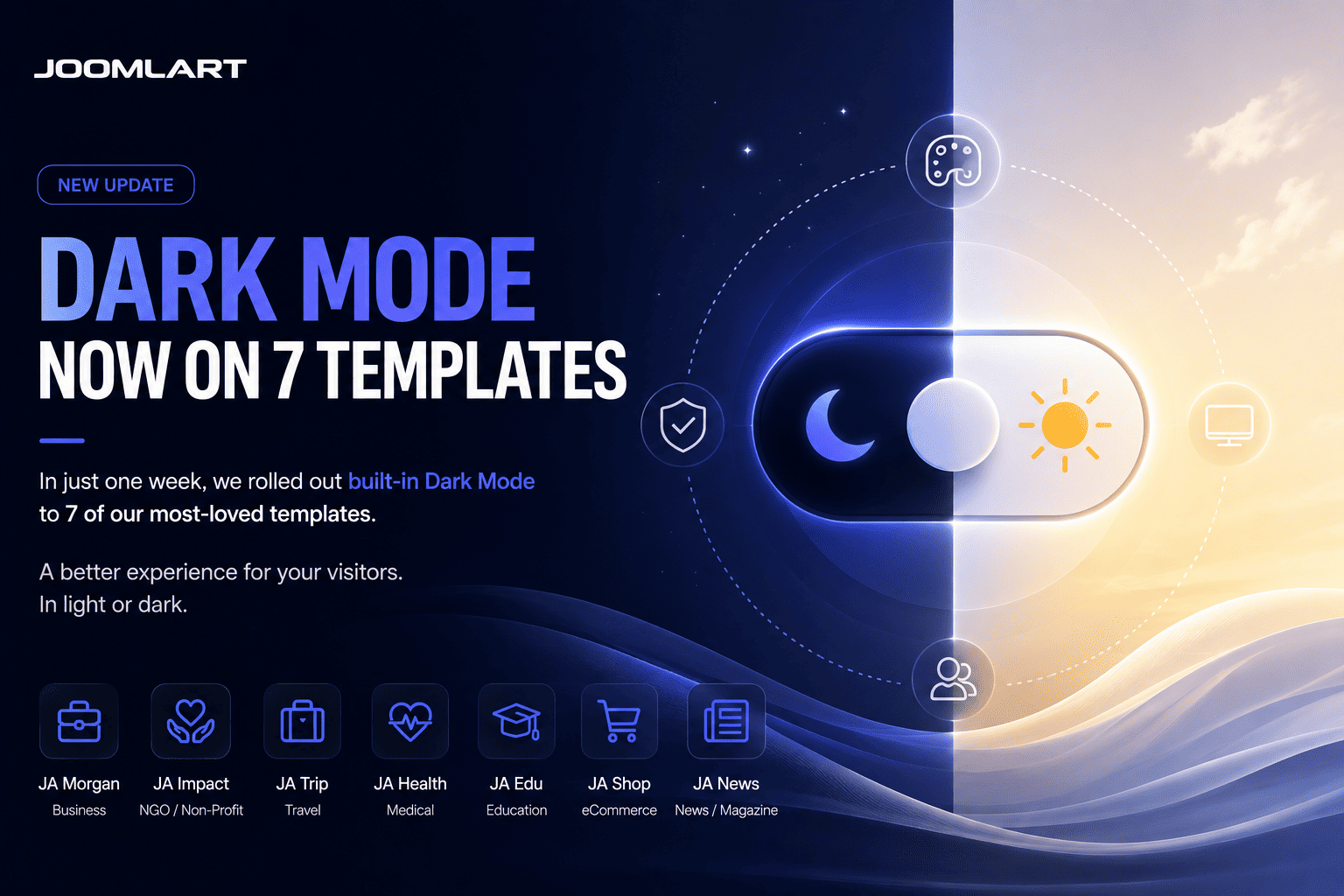
The Dark Mode roll-out isn't slowing down. After our first wave, seven more templates now ship with a built-in light / dark toggle - and one of them is a long-time favourite, JA Teline V.
Newly updated with Dark Mode
Each of these templates now includes a one-click sun / moon toggle, automatic detection of the visitor's system preference, and a remembered choice for returning visitors - while your existing light design stays exactly the same.
- JA Teline V - our best-selling news & magazine template
- JA Athena - university & education
- JA MixStore - multipurpose eCommerce (VirtueMart & J2Store)
- JA Phio - portfolio & creative showcase
- JA Helple - charity, NGO & fundraising
- JA FindUs - business & directory
- JA Vital - health & nutrition
And we're not done - more templates are getting Dark Mode every week.
Why Dark Mode?
A dark option is now something visitors expect. It's easier on the eyes in low light, gives your site a more modern, premium feel, and lets each visitor choose the experience they prefer - all without changing your site's structure.
How to update
- Download the latest package for your template from your JoomlArt account.
- Install the update over your current template.
- Open your site and click the sun / moon toggle in the header to preview Dark Mode.
Your content and existing configuration stay in place. Prefer light only? Leave it - light mode remains the default and untouched.
Every one of these updates is included with a JoomlArt membership - along with all 200+ templates and everything we ship next.
More Dark Mode templates are on the way - stay tuned.
— The JoomlArt Team